
 English
 Română
About Google Ads – Google Adwords
Google AdWords was launched in 2000, Just two years after the search engine. Works as a Pay-Per-Click marketing strategy that targets digital consumers. In 2018, The platform was renamed Google Ads.
While the Google market is full of potential potential customers, its popularity is made by a competitive atmosphere. At the end of the year 2019, The ads on the platform were viewed by 90% of the population on the Internet. And, keyword costs are increasing, making these campaigns increasingly expensive. This shift has led to questions such as “what can I do to avoid overspending and still meet the demands of an oversaturated market?”
Google Ads may be confused, and business owners to make their mark, but there are still ways to conquer. Video is a perfect example of an untapped resource, with sufficient growth potential.
Let's take a closer look at how Google Ads works on video and how to make it work for you.
Understanding Google Ads for Video

Formatted in YouTube advertising through Google Ads
The most used YouTube video ads are called TrueView ads and come in three formats.
-
In-Stream:
as the title suggests, an in-stream ad is one that plays during a YouTube video stream. The host of the video, also known as a YouTube partner, agrees that advertisements may be served in exchange for monetary compensation. Normally, they appear at the beginning, middle or end of stream. In-stream ads are beneficial, because it gives the viewer the option to skip the ad after five seconds and return to their video. Unlike other types of PPC content, these ads don't charge you unless a viewer watches your ad for 30 seconds or more.
-
in search:
unlike in-stream content, search ads are related to keywords. When a YouTube user searches for your word. key, your ad. appears in the results window. If the ad video is clicked, you will be charged for it. This method does not have the safety net of the five-second jump rule, but it has its own merits. For example, your ad. it is more likely to reach your intended audience if it is served by a search term.
-
In-Display:
In the end, in-display ads are those that appear in the sidebar or search results. These are marked with an "ad" indicator. After clicking, you will be charged for the ad. These ads are extremely accurate, guaranteeing the viewer that they wanted to see your content. Unlike other ad formats that auto-populate, the viewer chooses this advertisement by himself.
A fourth option was previously available and offered the viewer a choice of three ads to watch during a video by 10 or more minutes. This format has been retired in favor of alternative TrueView styles.
Linking your ads. the video
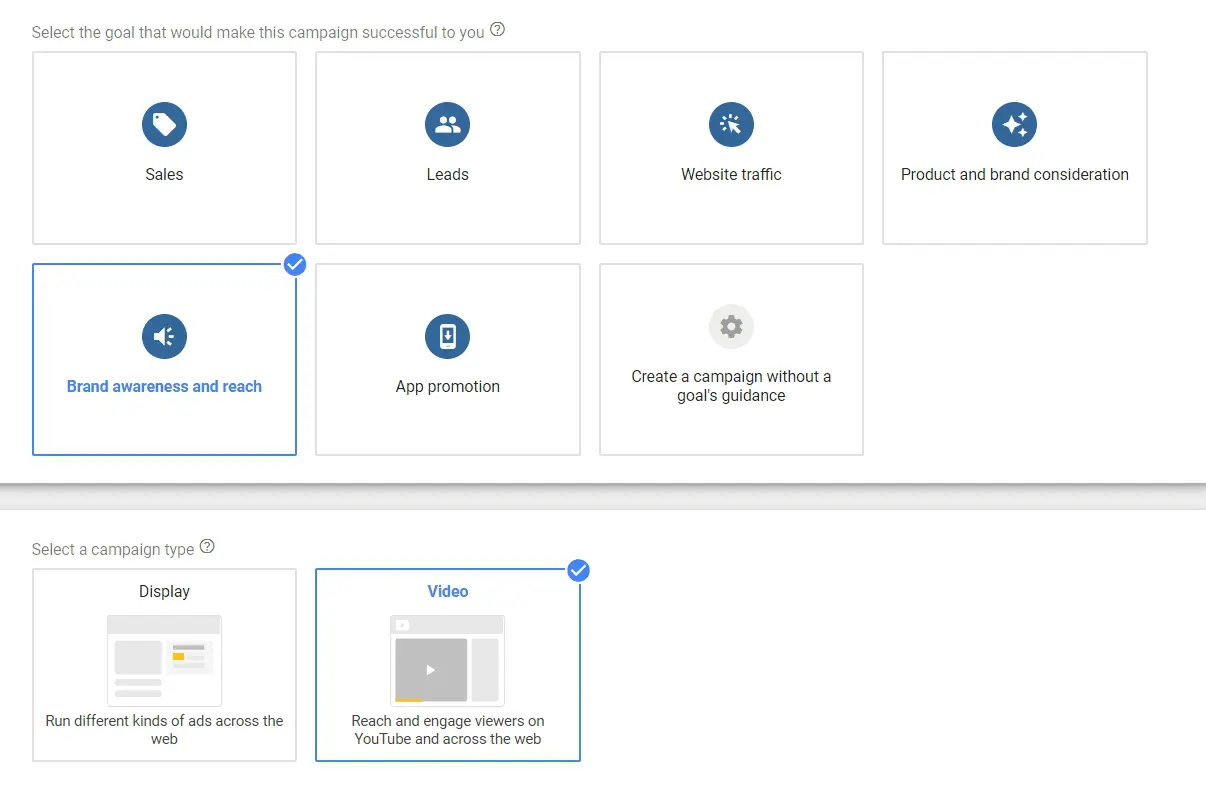
Google Ads campaign for Youtube
Before we start with the intricacies of connecting ads to streaming video, you need a Google and YouTube account. After you have set them up, create your Google Ads account. Now you're ready to log in and start your campaign with these simple steps:
Connect your accounts
From your page. Google Ads, select the setup option and proceed to connect your accounts. YouTube should be one of the options listed in your account panel. If you have multiple YouTube channels, you can choose the ones relevant to your ad.
Create and specify campaign conditions
From the Announcements panel, select "campaigns", "add campaign", then "video". The tool will ask you to specify whether you want to increase brand awareness or brand consideration with your video. After selecting a campaign, give it a title and set how much you will spend daily. The campaign conditions you need to specify are:
- Launch and Close Date
- Language and countries to broadcast
- Whether the video is in search, in-stream sau in-display
- your strategy. of bidding
- An appearance schedule
An advantage of this advertising strategy is that it targets your audience. according to demographics and interests. This breakdown appears under the 'people' tab and allows you to target consumers via:
- Age
- Gen
- Family size
- Source of income
- Celebrations of life events
- Interests or affinity
- Past interactions
- Similar interests
- CUSTOMS
With the chosen audience, you can now select your placement by clicking on the websites or YouTube channels you want your ad to run on. Also, you can select keywords and categories that relate to your target audience.
Run and monitor the ad
After completing the ad creation processes, all that remains is to publish and maintain. Ad metrics reports will show you how your ad is doing and where it needs to be improved.
5 tips for Google Ads video success
Now, that you know how Google and YouTube ads work together, here are five tips for a successful campaign:
1. Create an ad that people want to see
Instead of designing an ad for your consumers., they don't mind pausing a video, design an ad they want to watch from start to finish. Consider your target audience and the videos they are drawn to. The key to a successful video ad is to make your audience forget it's an ad.
A unique way to showcase a brand and reduce its appearance as an ad turns it into something interactive. For example, if you were a shoe company launching a new sneaker, you might be tempted to create a commercial-style ad. Instead, why not show viewers something they've seen and design the ad as an instructional video to run?
2. Display real consumer reviews
Nine out of ten consumers read reviews before buying a product or service. It has become second nature to see what others have to say before trying something for ourselves. As a marketer, you can take advantage of this fact by including real customer reviews in your ad. video.
An example of this is the Hello Fresh video campaign from 2017, which shows a couple named Tre and Rich. The video opens with Tre explaining why he started using the service and how it benefits their home. This style of marketing is relatable and evokes an emotional response – two things that equal success in an ad.
3. Keep it short and sweet
This is a particularly useful tip for ads served in the middle of another video. Take the consumer's attention away from the original link they clicked. Keeping your content short and sweet improves the chances that a viewer will let it run until completion. As a guide, you should try to keep ads between 12 and 20 of seconds.
4. Do your research before you write
Understanding what your target demographic wants to see is crucial to a successful advertising campaign. Research which YouTube ads are doing well in your industry. and what types of videos they appear in.
Also, you can ask your audience directly what kind of ads they'd like to see and where. Use a survey in your social feed or send a survey via incentivized email to gather information.
5. Draw inspiration from past content
You've done your research; you know your audience. You probably have plenty of content already posted on blogs and social feeds to prove it. Instead of trying to create new ads from scratch, use inspiration from past content. Repurposing your own content to form something new as a video is a brilliant way to give your audience something you already know has been successful.
Overcome Google ad traffic bottlenecks with video
They call it the information highway, so it's no wonder digital marketing feels like rush hour driving. 63% of consumers say they would click on a PPC ad, so that, in addition to organic search, Google Ads is definitely a way to go.
There may be no reprieve for cars stuck in hours 17:00. traffic jam, but marketers are much luckier. Video marketing uses tried and true PPC ads in a less cluttered environment. Invest in PPC video marketing and you'll give yourself a much better chance of standing out in your industry or niche.
Google Ads is the new name of the Marketing service from Google, the old name being Google Adwords. Google Adwords is the old name of Google's Marketing service. It is the platform where bids are made to be displayed on the Google website, sites owned by Google such as YouTube, or partner sites, millions of Google partner sites through which Google pays for Ads through the Google Adsense program.What is Google Ads
With Google Ads you can create display and search campaigns. To appear in google when you search for something, you need a search campaign.What is Google Adwords?